Comparisons · 8 min read
Best AI Real Estate Photo Editor: A Buyer's Guide
The best AI real estate photo editors, sorted by job: HDR blending, sky swaps, decluttering and virtual staging, plus which edits need a disclosure label.

The best AI real estate photo editor depends on the job you need done. For a whole set edited in your own style, Imagen AI is the name most roundups put first. For speed, AgentUp says five minutes. For HDR blending on interiors, CubiCasa, Photomatix Pro and ON1. For phone-first shooting and editing, Pixa by BoxBrownie and Nodalview. For free edits in a browser, Pixelbin. This guide sorts each one by the job it is named for, then covers the edits that need a disclosure label, the order to work in, and what editing actually costs.
Best AI real estate photo editor: the short answer
- Imagen AI is the name most roundups put first, and the top result in this search says it learns your personal editing style. That matters when a hundred photos have to match.
- AgentUp says its AI real estate editing delivers in five minutes, which suits an agent who needs a set back the same afternoon.
- CubiCasa is built around AI-powered HDR blending for interiors, and its page says it processes images in minutes.
- Pixa by BoxBrownie and Nodalview are the phone-first options in the six-tool test that ranks on page one.
- Pixelbin is the free browser route: upload a JPG, JPEG, WEBP or PNG and it fixes lighting, vertical lines, skies and clutter, per its page.
- For bracket blending with manual control, that same six-tool test lists Photomatix Pro (AutoHDR) and ON1.
No single tool wins every job. The list above is short because the search rewards a straight answer, not because one product covers all six cases. Match the tool to the work you actually do.
The best AI real estate photo editors, by job
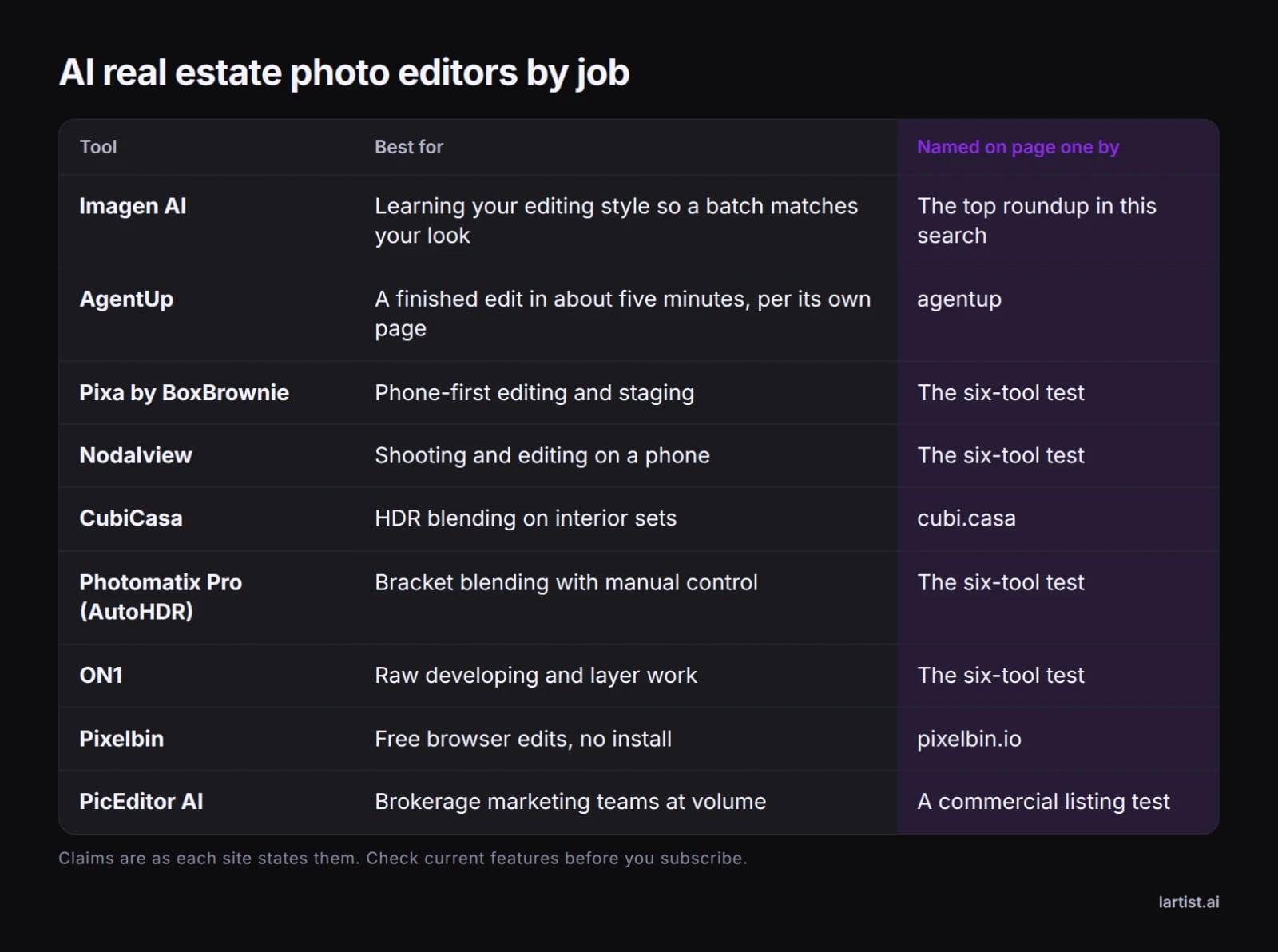
Pick by the job, not by the feature list. An agent sending 20 phone photos a week and a photographer delivering 120 brackets a month need different tools, and the six-tool test that ranks on page one is written mostly for the second person.
Bracket blending and colour
A three to five frame bracket still needs blending, and CubiCasa, Photomatix Pro and ON1 are the names page one gives for it. Blending before colour work is what keeps a window from turning white and a wall from turning orange. If you shoot brackets, this is the category to spend on.
Decluttering and skies
Pixelbin lists lighting, vertical lines, skies and clutter as one-click fixes. AgentUp and Imagen AI fold the same corrections into an automated pass over a whole set. The difference is control: a one-click fix is fast and occasionally wrong on a tricky edge, while a manual editor costs time per photo.
Staging and volume work
PicEditor AI is listed for brokerage marketing departments doing architectural retouching at volume, and Pixa by BoxBrownie covers staging next to the basic edits. Staging is the one category where a concept can change what a buyer thinks the room is, so it carries the labelling rules in the next section.
Listing-safe fixes vs staging concepts

Fixes that keep the photo true
Start with the fixes a buyer would never notice as edits: exposure, white balance, straightened verticals, a cleaner sky, a bin removed from the hallway. These keep the room as it is. They do not move a wall, add a window or make a small room look large, and that is the point. A buyer who visits should recognise every room from the gallery.
Concepts that need a label
Virtual furniture, a changed wall colour, a fireplace that is not there: these are concepts, and in many markets the listing has to say the image was virtually staged. Rules differ by board and portal, so check yours before the set goes live, and keep the original frames.
Never edit out a crack, a stain or water damage. That is the kind of change a buyer can hold you to long after the sale, and no tool or service should be asked to do it.
The order that gets the best result

Cull first. A clean set of 25 beats 60 mixed frames, and every later step costs time per photo. Match exposure and white balance across rooms before anything else, so the gallery does not jump from orange to blue. Then straighten verticals, because lines parallel to the frame edge do more for a listing than any filter.
Blend brackets before colour work if you shot three to five exposures. Fix the sky on exteriors, then declutter, then stage, then label. The order matters because staging on a crooked frame wastes the staging, and labelling after export is how files get missed.
How much do real estate photo editors charge?
There is no single rate. Editors bill per photo, per batch subscription or per service, and the number moves with volume, turnaround and whether you send raw brackets or finished JPEGs. Ask three questions before you commit: does a bracket set of three to five frames count as one photo, what is the turnaround, and who adds the virtual staging label.
Human editing and staging services charge for a person's time, so ask for a per-photo quote against your monthly volume rather than judging a headline rate. Automated tools usually run on a subscription or a pack of edits, which suits steady volume and hurts when a month is quiet.
Lartist bills in credits rather than per photo. Every feature spends credits, plans give credits each month or each year, and credit packs top them up. The plans are on /pricing.
Editing a listing set in Lartist's browser studio
Lartist runs in the browser, so there is nothing to install, and the interface is in English, French and German. That suits an agent editing between viewings on a laptop.
Clean the frame
Open the photo in the studio editor and describe the change: remove the bin beside the door, take the cable off the floor, repaint the scuffed wall. The editor redraws that part of the picture. Keep the change to what a buyer would call tidying, not repair.
Swap or calm the sky
Background replacement handles the exterior shot. Keep the season and the light believable, because a midsummer garden under a grey winter sky reads as fake. For edge cases on a sky or a window line, see photo background change.
Try a furnished concept
Describe the room you want to see, a sofa, a rug, a table, and the editor draws the concept. Object detection helps when you want to point at one thing rather than describe the whole room. Treat the result as a concept, not a plan; the room you can actually build is covered in our guide to taking an AI interior concept to a buildable room.
There is no separate erase or upscale button. Cleaning up a listing photo is done in the studio editor like any other change. Every feature spends credits, so see the plans on /pricing before you start a large set, and read why Lartist if you want the short version of what the studio does.
Free, online, or a service: which route fits

Free. Pixelbin advertises free editing with no hidden costs and takes JPG, JPEG, WEBP and PNG. Free is a good way to test whether an automated pass suits your photos before you pay anyone. Check the export size and what happens to your files before you send a whole listing through it.
Online. Browser editors need no install, which matters when you edit on a laptop between viewings and cannot wait for a desktop program to open.
Services. A human editor or staging studio takes the whole set, which is what brokerages with volume often want, at the cost of a slower turnaround on a Friday listing.
Most working agents end up with two tools: one automated pass for the everyday set, and one manual editor for the difficult room.
Can ChatGPT edit a photo?
ChatGPT can generate an image and edit one inside its chat, which makes it handy for a quick concept of a furnished room or a mood board for a seller. It is not built for a 30-photo listing set. You work one image at a time, and each result is a new picture rather than a corrected version of the frame you shot.
For a listing, keep the camera's geometry. Use a tool that corrects the photo you took, and keep ChatGPT for staging ideas and the conversation with the seller.
Before you upload: a listing checklist
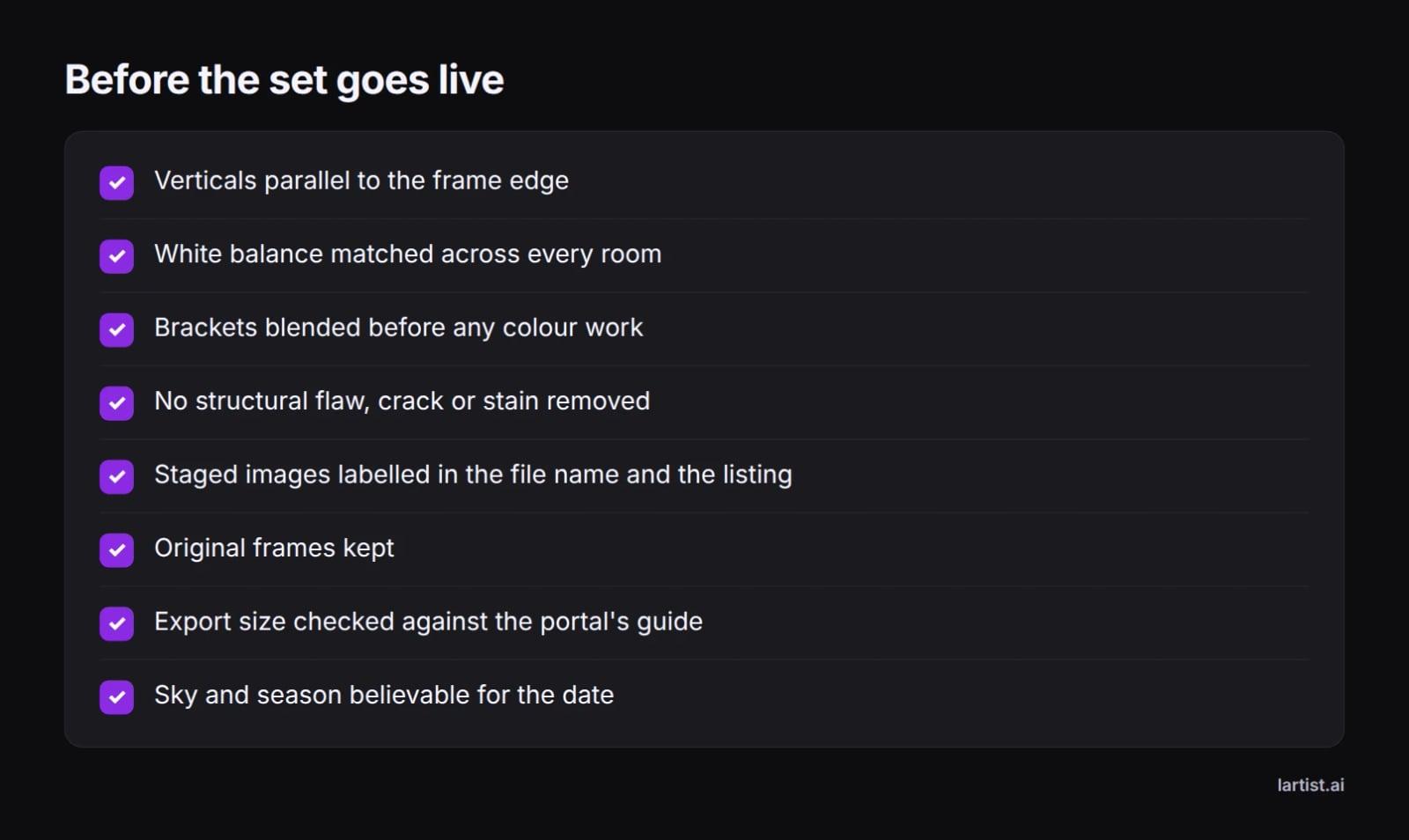
Run this list on every set. It takes two minutes and it catches the three mistakes that get a listing photo pulled: a crooked frame, an unlabelled staged room, and a flaw that quietly disappeared. Keep the originals. If a buyer, a board or a seller asks what changed, the original frame is your answer.
FAQ
Which AI is good for editing pics?
For real estate work, Imagen AI, AgentUp and CubiCasa are the names page one puts forward for automated edits, while Photomatix Pro and ON1 cover manual bracket work. For general photos, any editor that corrects exposure, colour and verticals without inventing detail is a reasonable start.
How much do real estate photo editors charge?
Rates follow one of three models: a rate per photo, a monthly batch subscription, or a price per service such as virtual staging. Ask whether a bracket set of three to five frames counts as one photo, what the turnaround is, and who applies the staging label. Lartist uses credits, and the plans are on /pricing.
Can realtors use AI for photos?
Yes, for corrections that keep the room true, and for staging concepts as long as the listing says the image was virtually staged. Do not remove structural flaws, and check your board or portal rules before the set goes live, because they differ by market.
What is the best real estate photo editing app?
On a phone, the six-tool test on page one points to Pixa by BoxBrownie and Nodalview. For a desktop workflow with brackets, the same test names Imagen AI, Photomatix Pro (AutoHDR) and ON1. The right pick depends on whether you shoot brackets or phone frames.
What is the best AI for editing real estate photos?
Imagen AI is the name most roundups put first because it learns your editing style across a set. AgentUp claims a five-minute turnaround, CubiCasa focuses on HDR blending for interiors, and Pixelbin covers free browser edits. Match the tool to your volume and your shooting method.
What do realtors use to edit photos?
Most use an automated editor such as Imagen AI or AgentUp for the everyday set, an HDR tool such as Photomatix Pro or ON1 when they shoot brackets, a free browser tool such as Pixelbin for quick fixes, and a human service when a listing needs staging.
What is the best way to edit real estate photos?
Cull, match exposure and white balance across rooms, straighten verticals, blend brackets, fix the sky, declutter, stage if you stage, then label and export at the portal's size. Doing the steps in that order saves the most time and the most re-edits.
Can ChatGPT edit a photo?
It can generate and edit images inside its chat, so it works for a concept of a furnished room. For a listing set it is the wrong shape: one image at a time, and each result is a new picture rather than your frame, corrected.
Is there a free online AI real estate photo editor?
Pixelbin advertises free browser editing with no hidden costs and accepts JPG, JPEG, WEBP and PNG. Free tools are a fair test of an automated pass, but check export size and what happens to your files before you send a whole listing through one. For Lartist, the plans are on /pricing.