How-To · 8 min read
Free AI Video Generator From Image: A Shot-by-Shot Guide
Free image to video tools all hide a limit. Learn the motion prompt, pick 3, 5 or 10 seconds, judge a bad take and read any free plan in a minute.

A free AI video generator from image turns one still photo into a short clip, usually 3 to 10 seconds, by reading a text prompt that says what should move and how the camera should behave. The tools are easy to find. The craft is not. Most free tiers hide a watermark, a length cap, a resolution cap or a queue, and the pages that rank for this phrase are mostly developer packages, not something you can point at a photo today. This guide covers the whole job: pick a still that can move, write one action and one camera move, choose a length, judge a bad take, and read any free plan in a minute.
What free image to video actually means
A free image to video generator takes a single still and animates it. You give it the photo and a short prompt. It gives back a few seconds of video. The quality of that clip depends far more on the still and the prompt than on the brand on the landing page.
What the first page offers
Search this phrase and most of what comes back is developer material. There are Python and Go packages on pypi.org and github.com, a Firefox add-on listing on addons.mozilla.org, and a Railway hosting template. None of those turns your photo into a clip on its own. They are plumbing for people building something else.
The PyPI page for freeimagetovideo lists clips of 4, 5, 6, 8, 10 or 15 seconds at 480p or 768p, in 16:9, 9:16 or 1:1 frames. It says it has no daily cap and needs no sign up to start. That is one tool's terms. Every tool writes its own.
If you want a wider view of the field, our image to video tools compared covers the options by what they are good at.
The four limits
Behind the word free sit four limits: a watermark on the export, a cap on seconds, a cap on resolution, and a queue or a daily rate. Most free tiers carry at least two of them.
Pick the tool whose limit hurts you least. A watermark matters if the clip goes public. A length cap matters if you need a whole scene rather than a cutaway. A resolution cap matters if the clip will be shown large.
Read the export, not the landing page. One download tells you more than a page of badges.
Start with a photo that can move
What makes a good starting still
One clear subject the tool can separate from the background. A crowd or a busy street gives it too much to track, and the motion blurs what it cannot hold.
Room in the direction of the motion. A ship needs sea ahead of it, a runner needs track, a bird needs sky. If the subject is already at the edge of the frame, the first second of movement will push it out.
Fix damage first. Dust, a stray object or a soft face gets amplified by motion. In Lartist you describe the change in the studio editor and it redraws that part of the picture, so you can clean up the photo before you animate it.
Crop to the shape you will post in before you generate, not after. A 9:16 crop made after the fact throws away the composition you planned.
Get the still ready
In Lartist, image to video starts from a still you bring into the Lartist video studio. The studio runs in the browser, so there is nothing to install.
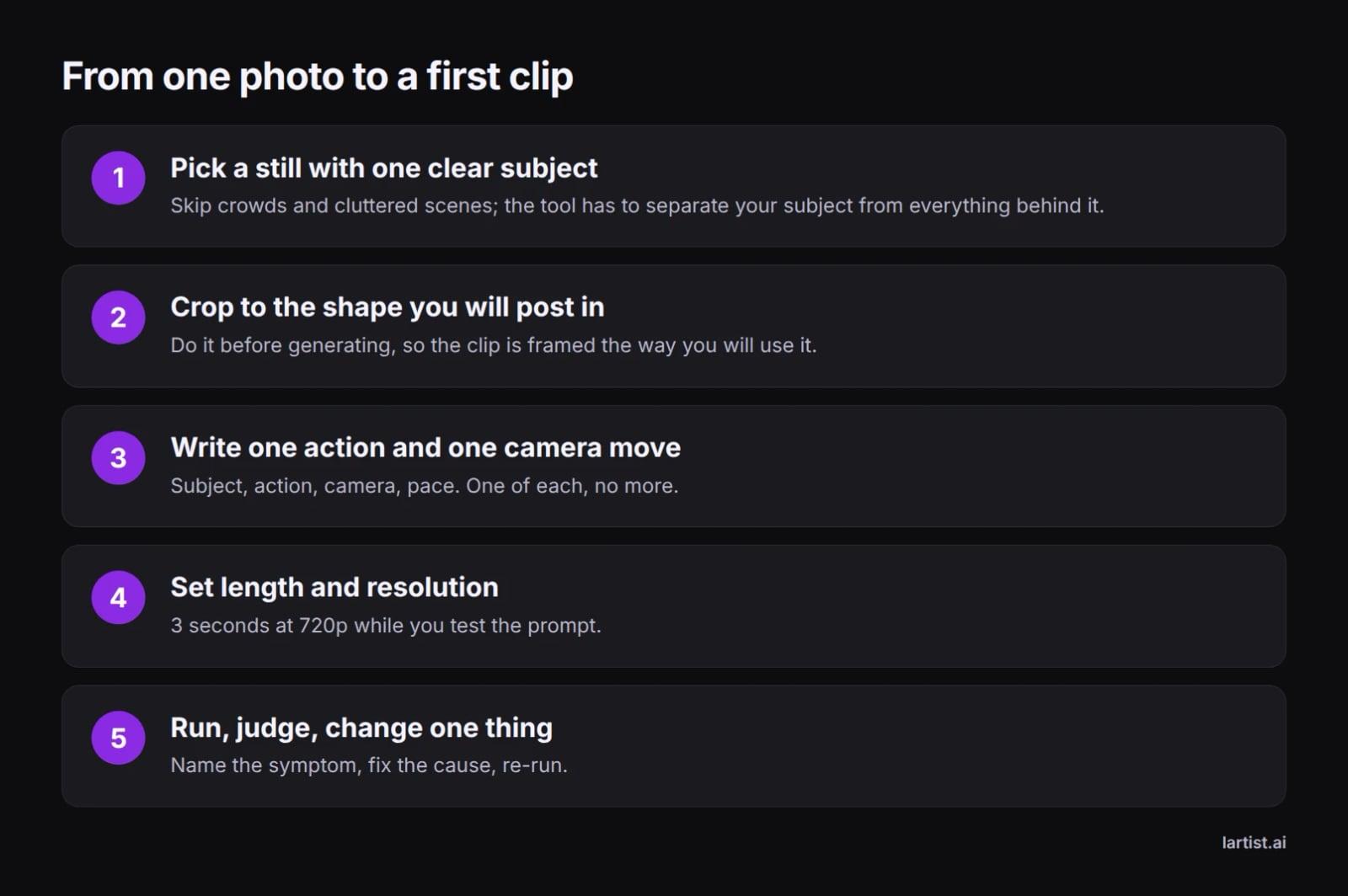
The same five steps work on any tool, free or paid.
Write the motion prompt: subject, action, camera, pace
The four parts
Subject: name the one thing that moves. Not the whole scene, not three people, one thing.
Action: a physical verb you could film. Write "steam rises and drifts left" rather than "atmospheric". The tool cannot animate a mood. It can animate a body.
Camera: slow push in, slow pull back, gentle pan, or hold still. Choose one and only one. Two camera moves in a three second clip is a recipe for a bent frame.
Pace: "slowly", "gently", "in one steady movement". Short clips need slow motion or the frame breaks apart.
One action per clip. Two actions in three seconds reads as a smear.
Example prompts
Sailing ship: "the sails fill and ripple, the sea rises and falls, camera slowly pushes in".
Butterfly: "wings open and close slowly, petals tremble, camera holds still".
Figure in mist: "mist drifts from right to left, the cloak stirs, camera pans slowly right".
Each prompt names one subject, one action, one camera move and a pace. That is the whole shape. Once you can write that sentence, the tool matters much less.
Choose 3, 5 or 10 seconds, and 720p, 1080p or 2k
Length is a story decision and a budget decision. Lartist makes clips of 3, 5 or 10 seconds, and credits depend on the length and the resolution you pick.
Here is what each length can hold.
Lartist makes 3, 5 and 10 second clips at 720p, 1080p or 2k.
3 seconds is the test length. Use it to find out whether the still and the prompt agree before you spend a bigger run.
5 seconds is the workhorse. It holds an action and a small reaction, which is most of what a feed post needs.
10 seconds needs a reason to hold the eye. A product turning, a wide landscape opening up, a slow reveal. Without that reason it feels long.
Resolution follows the same logic. 720p for tests and messaging, 1080p for feeds, 2k when the clip will be cropped, projected or shown on a large screen. Test low, finish high.
Every clip on Lartist spends credits. You can see the plans to check what each one includes.
Watch the take, then change one thing
Check four things when a clip comes back. The subject keeps its shape. The background stays where it was. The edges hold, meaning hands, hair and thin branches. The camera does exactly one move.
Name the symptom before you re-run, so you fix the cause instead of rolling the dice again.
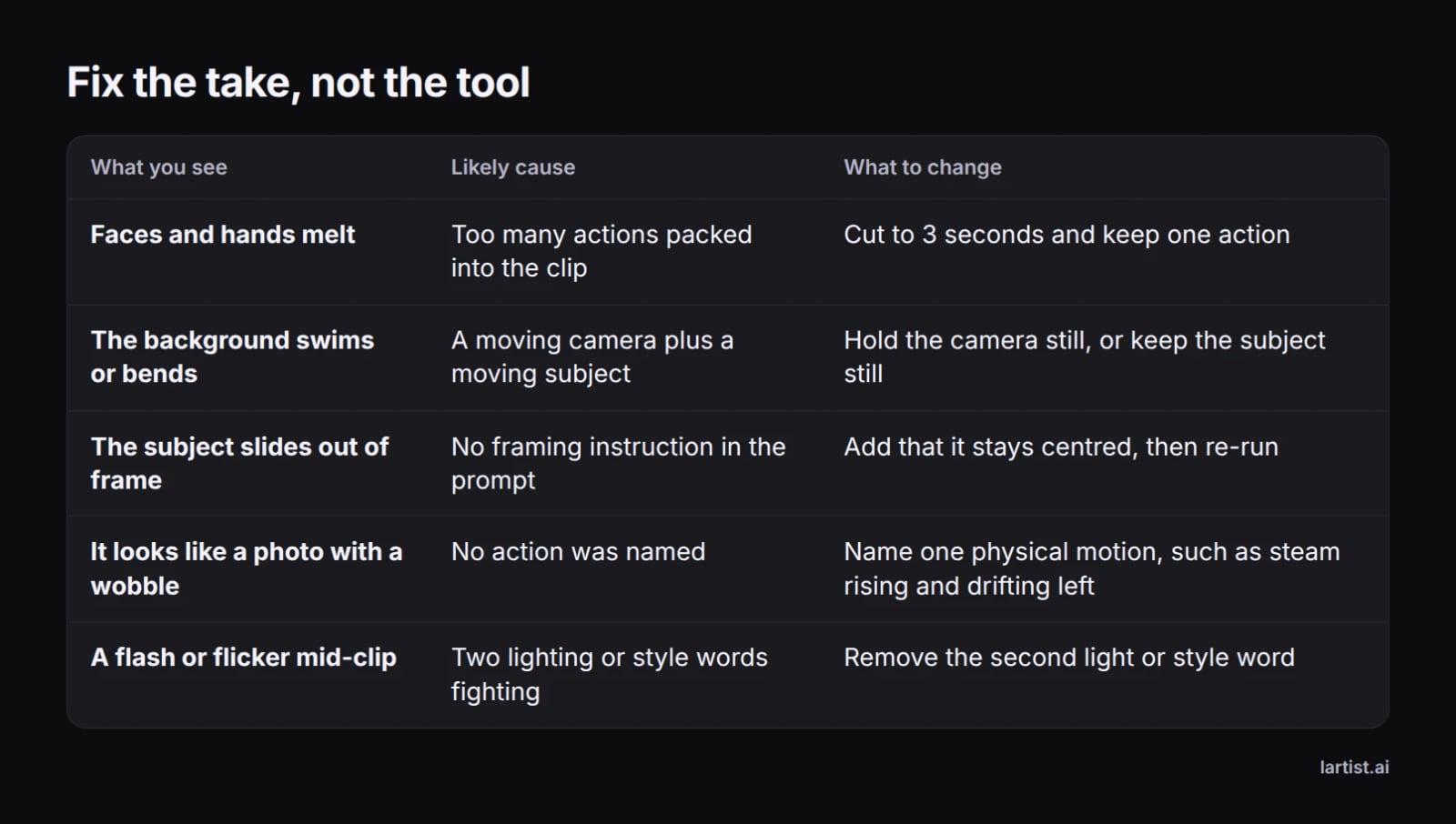
Diagnose the take before you spend another run.
Faces and hands melt when too many actions are packed in. Cut to 3 seconds and keep one action. A swimming background usually means a moving camera plus a moving subject. Hold one of them still.
Change one variable per run. If you shorten the clip and rewrite the prompt at the same time, you learn nothing about which change worked.
Two or three runs is normal for a good clip. Ten runs means the still or the idea is wrong, not the settings.
Chain clips into a short sequence
Plan four to six shots on paper before you generate anything, each 3 to 5 seconds long. A shot list keeps you from generating beautiful clips that do not cut together.
Keep the camera grammar consistent. If shot one pushes in, shot two should not whip pan. Pick a rhythm and stay inside it.
Match the light and time of day across the stills before you animate them, so the cuts do not jump. A noon still next to a sunset still reads as a mistake, not a style.
Cut on the action. End clip one mid-move and start clip two mid-move. The eye follows the motion across the cut and stops noticing the edit.
Reuse the same subject photo wherever you can, so the face or the object stays recognisable across shots.
Read any tool's free page in one minute
Generate one clip and download it. The export is the only honest description of the free tier. Everything else on the page is a claim.
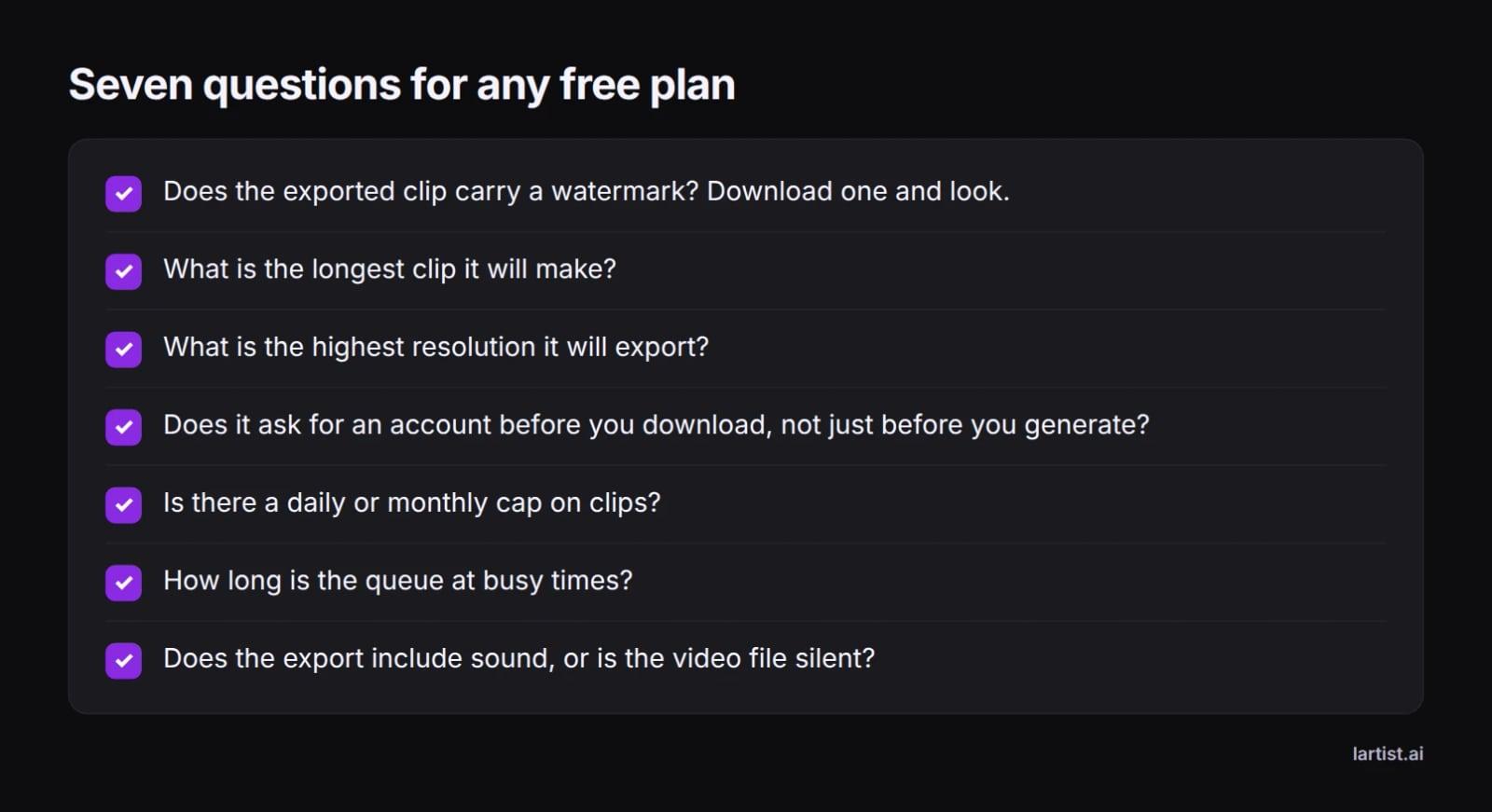
One minute on the export saves an hour on the wrong tool.
Ask seven questions: watermark, maximum seconds, maximum resolution, account needed before download, daily or monthly cap, queue time, and whether the export carries sound.
"No sign up" usually means you can generate before creating an account, then the download step asks for one. Test it with a real clip, not a demo.
"No restrictions" is marketing. Every service has content rules and technical caps. The checklist tells you which ones apply to you. Reddit threads are a fast way to hear which free tier broke this week, but treat them as tips, not terms.
A free tier you can describe in those seven answers is a free tier you can plan around.
Where Lartist fits
Lartist is an AI art studio that runs in the browser, with nothing to install, and the interface is in English, French and German.
It does text to video and image to video at 3, 5 or 10 seconds, in 720p, 1080p or 2k. Every clip spends credits, and the amount depends on the length and the resolution.
It is not a free tool. Plans give credits each month or each year, and credit packs top them up when you run short. You can see the plans for the details, and read why Lartist for the studio itself.
If you want the craft first and the tool second, start with the still, write one action, run 3 seconds at 720p, and judge the take before you spend anything bigger.
For a wider comparison of tools by need, see our AI video generators compared by what you need.
FAQ
Is there a free AI video generator from image with no sign up?
Yes, some tools let you generate a clip before you make an account, but the download often asks for one. The freeimagetovideo package on pypi.org says it starts with no sign up and no daily cap. Test the whole path, generate and download, before you trust the claim.
Can I make an AI video from an image with no restrictions?
No. Every service has content rules and technical limits. Free tiers usually cap length, resolution or daily clips, and many add a watermark. The phrase no restrictions is marketing, so read the export and the terms. A tool with clear limits you can plan around is more useful than a vague promise.
Do free image to video generators add sound?
It depends on the tool, so check the exported file. Some list sound as a feature, such as the freeimagetovideo package on pypi.org, while others export a silent video. A silent clip is not a failure, because you can add music in your editor. Never assume sound until you play the download.
Why does my image to video clip look warped?
Usually because the clip asks for too much motion. Two actions, a moving camera plus a moving subject, or a subject near the frame edge will bend faces, hands and backgrounds. Cut to 3 seconds, keep one action, and hold either the camera or the subject still. Then re-run and change only one thing.
How long should an image to video clip be?
Three to five seconds suits most uses. Three seconds is enough for one action and one camera move, which is ideal for testing a prompt or making a cutaway. Five seconds adds a small reaction and fits most feed posts. Ten seconds needs two beats or one slow reveal to hold attention.
What is the best free AI video generator from image?
There is no single best one, because free plans differ in watermark, length, resolution and queue. Pick the tool whose limit hurts you least: no watermark if the clip goes public, a longer cap if you need a scene. Test one clip on two tools and compare the exports, not the landing pages.