Comparisons · 9 min read
Best AI Photo Editor: Pick by the Edit You Need
The best AI photo editor depends on the edit: fixing a face, removing an object, swapping a background or restoring an old photo. Compare picks by task.

Best AI Photo Editor by the Edit You Need
Our pick for the best AI photo editor is the Lartist studio. It runs in a browser, so there is nothing to install, and it is built for the photo you already shot: you say in plain words what should change and it repaints that part of the frame. For a bad hand, a stray wire or a face that lost the likeness, that is the shortest route from file to fixed.
It is not the right pick for every job, and the first page does not agree on one. zapier.com names Adobe Photoshop as its overall pick for full-featured editing and design. blog.evoto.ai puts Evoto AI first, and picsart.com puts Picsart first, and both of those sites sell the product they rank. Worth knowing before you trust a numbered list.
So choose by the edit in front of you.
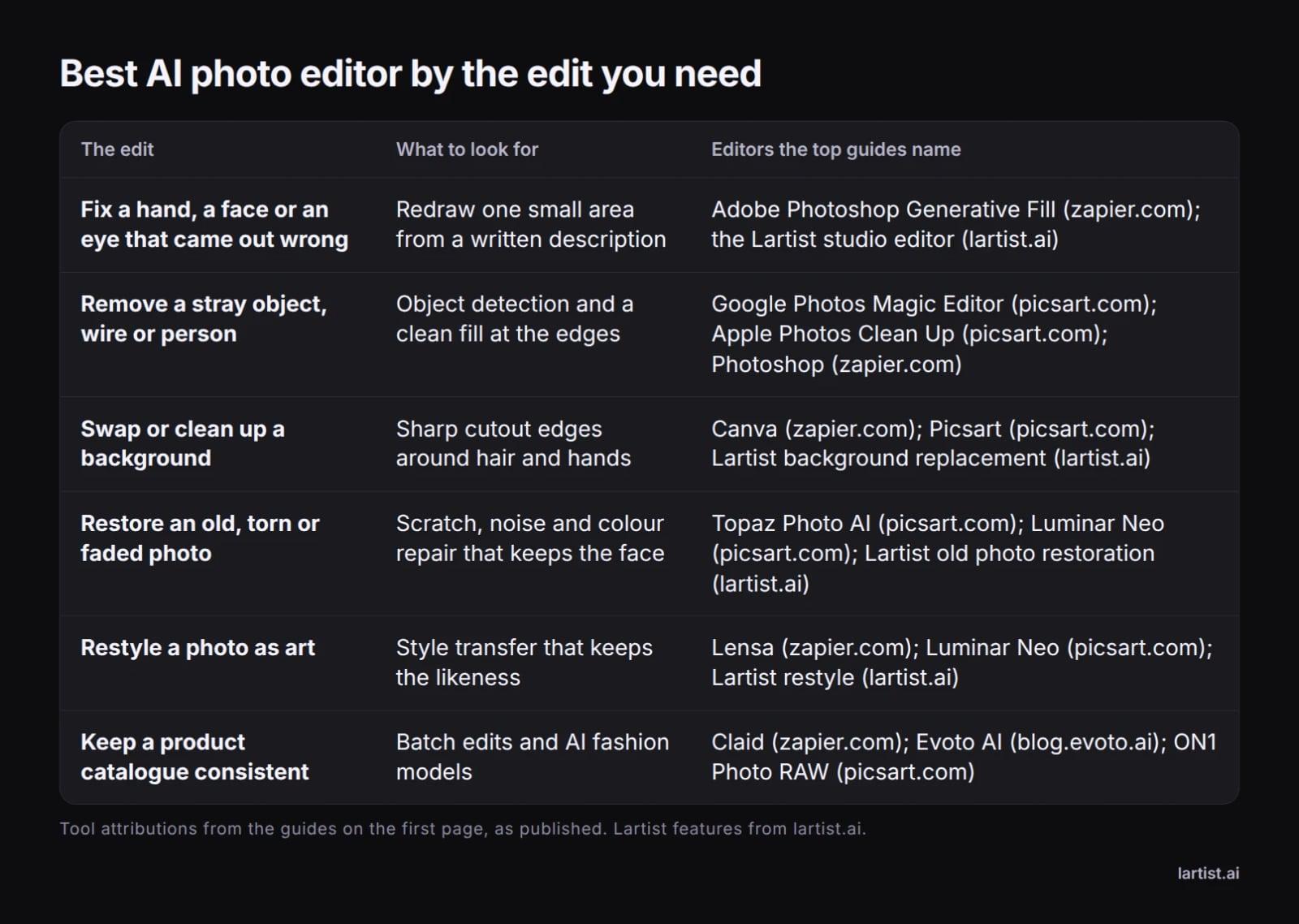
Best AI photo editor at a glance
The six edits people actually search for
What Does an AI Photo Editor Do?
An AI photo editor changes a photo you already have, using machine learning for the parts that used to need a steady hand: selecting a subject, filling a gap, smoothing skin, lifting noise. The label is older than it sounds. Photoshop shipped Content Aware Fill in 2010 and its first Neural Filters in 2020, as zapier.com notes, and much of what the app does now leans on machine learning.
In practice the AI shows up as background removal, object removal, sky replacement, portrait retouching, denoising, sharpening and generative fill. The one distinction worth holding onto: an editor changes your file, while a generator makes a new picture from a description. zapier.com draws that line, and it is why a generator can lose the face you needed to keep.
Fixing a Hand, a Face or a Stray Object
A hand with six fingers, a face that lost the likeness, a wire across a doorway. These are small-area edits, and they decide whether you keep a tool or uninstall it. They are also where cheap fixes show.
The edits that go wrong
Photoshop's Generative Fill works from a written description, as zapier.com notes. So does the Lartist studio editor: you describe the change and it redraws that part of the picture, whether the fault is a hand, a face or one patch of skin.
Removing something that should not be there
Lartist has no separate smart erase or inpainting tool. Removing a stray object and repainting part of a picture both happen in the studio editor, by asking for the area to be redone. You say what should go and what should replace it.
On other guides, picsart.com points to Google Photos Magic Editor for removing distractions and Apple Photos Clean Up for iPhone. zapier.com's removal advice centres on Generative Fill, which fills a selection from a text prompt.
Repairing an old photo
For old photos, picsart.com points to Topaz Photo AI for detail recovery and Luminar Neo for creative work. Lartist has a dedicated old photo restoration feature.
Whichever tool you use, judge a repair by the grain and the light where the patch meets the original, not in the thumbnail. A redraw either matches the surrounding texture or it does not.
Describe the Change or Drag a Slider: The Two Kinds of AI Editor
zapier.com draws the line clearly. Image generators recreate your existing picture with changes rather than editing it, which is why they set a different bar for a photo editor. The same split runs through editors themselves.
Editors where you type what to change
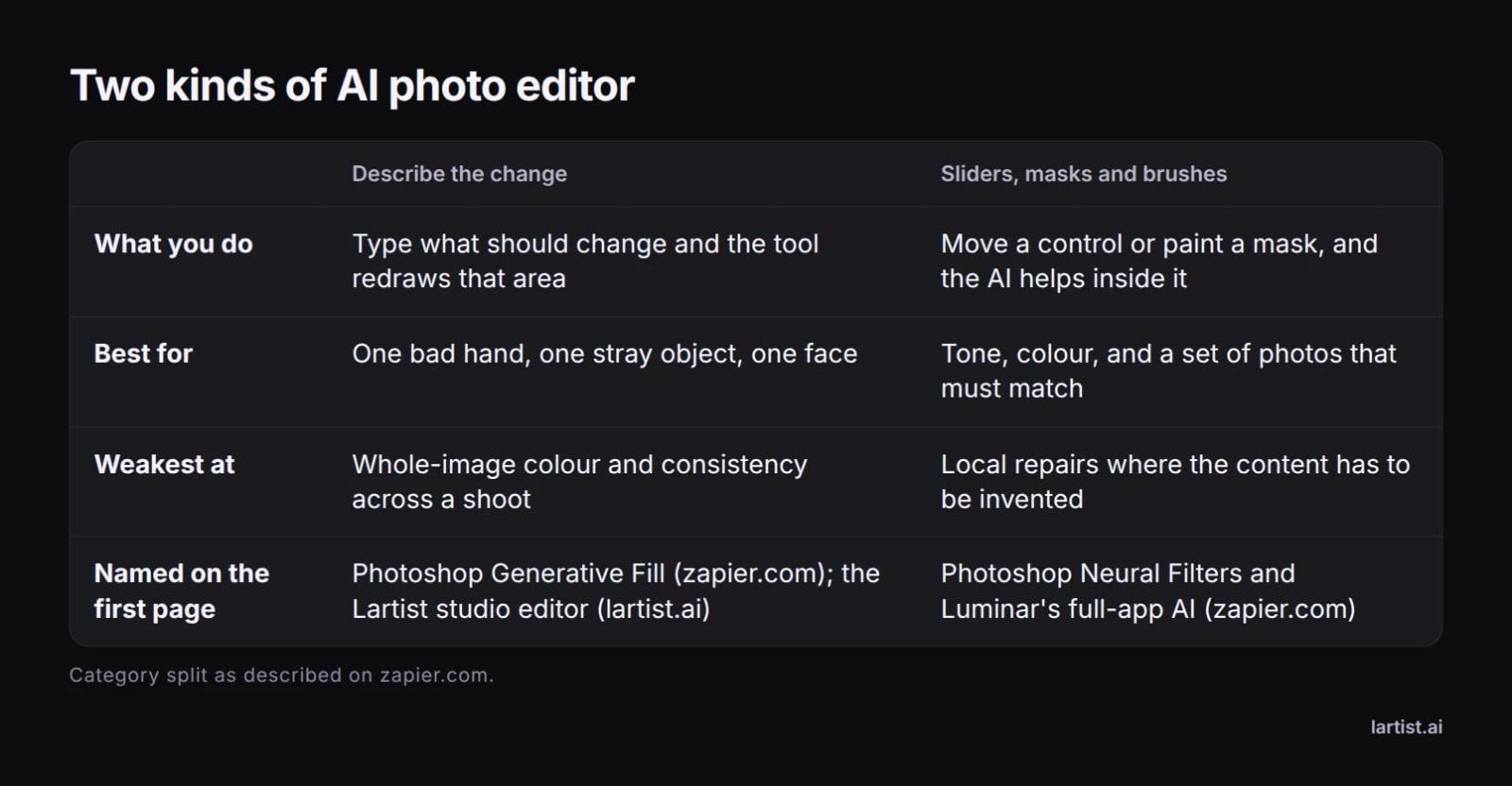
You type what should change and the tool redraws that area. This suits one bad hand, one stray object, one face. It is weak at whole-image colour and at keeping a hundred photos consistent.
Editors built on sliders, masks and brushes
The slider family is older than the AI label suggests. Photoshop added Content Aware Fill in 2010 and its first Neural Filters in 2020, and apps such as Lensa use simpler image recognition to tell a portrait from a landscape, both as zapier.com reports. These tools are best at tone and colour, and at a set of photos that must match.
Which one your edit needs
Describe-the-change suits a fix in one place. Sliders, masks and brushes suit tone, colour, and consistency across a shoot. Most editors now carry a bit of both, so ask which side the tool is built around, not which side it advertises on the homepage.
Best AI Photo Editor for iPhone, Android, Desktop and the Browser
On iPhone and Android
picsart.com names Apple Photos Clean Up for iPhone and Google Photos Magic Editor for quick generative edits. zapier.com picks Lensa for mobile portraits, free for limited features.
The mobile workflow is shoot, then edit in the same hand. That is the strength of the phone apps, and the limit: what you can do on a small screen with a thumb.
On Windows and Mac
On desktop, zapier.com lists Photoshop and Luminar, and blog.evoto.ai picks Evoto AI for PC, while picsart.com suggests ON1 Photo RAW or Topaz Photo AI for deep control.
In the browser
In the browser, zapier.com names Pixlr and Canva, and blog.evoto.ai names Pixlr Express for web. Lartist is a browser studio too, with nothing to install, and the interface is in English, French and German.
The platform you already work on is the easy decision. A tool that needs a new device is a tool you will stop opening by the second week.
Best AI Photo Editor Free: What You Get
The free picks on the first page are free tiers, not free software. The zapier.com table marks Canva as free for limited access, Pixlr as free for limited AI use and Lensa as free for limited features. picsart.com keeps a separate free section.
Free tiers tend to limit one of three things: a watermark on export, the size of the file you can save, or the number of AI actions in a day. Find out which before you build a workflow on it. A watermark only hurts if you export, and a daily cap only hurts if you batch.
On Lartist, every feature spends credits. Plans give credits each month or each year, and credit packs top them up. You can see the plans to compare.
Best AI Photo Editor With No Restrictions: What That Means
The search covers four different wishes: no watermark, no cap on how many edits you make, no device or country lock, and no surprise block on the file you uploaded.
No list on the first page ranks tools by restrictions, so the only reliable source is each vendor's terms of use and the exported file itself. Download one and open it. Content rules differ by vendor and change without notice. The terms page is the version that counts, not a screenshot in a forum post.
Best AI Photo Editor for Turning Words Into a Picture
zapier.com's warning is worth repeating: a generator recreates your image rather than editing it, so it falls short when you need the same face, the same room and the same light. Generation earns its place when the missing piece does not exist yet: a backdrop, a prop, an angle you never shot.
Lartist generates from text in the studio or in the chat, turns a sketch into a finished picture and applies an art style to a photo, plus templates and object detection.
Pair the two: generate the backdrop, then repaint the line where your subject meets it. See turn a sketch into a finished picture for that route, and turn a photo into a pencil drawing for the reverse.
Test Any AI Photo Editor on Your Own Photo in Ten Minutes
Take one photo whose faults you know, with a hand, a wire and a dull sky in it. Every tool gets the same file and the same request, in the same order. Then check the join at 100% zoom, and export and reopen the exported file, because that is where watermarks and downscaling show up.
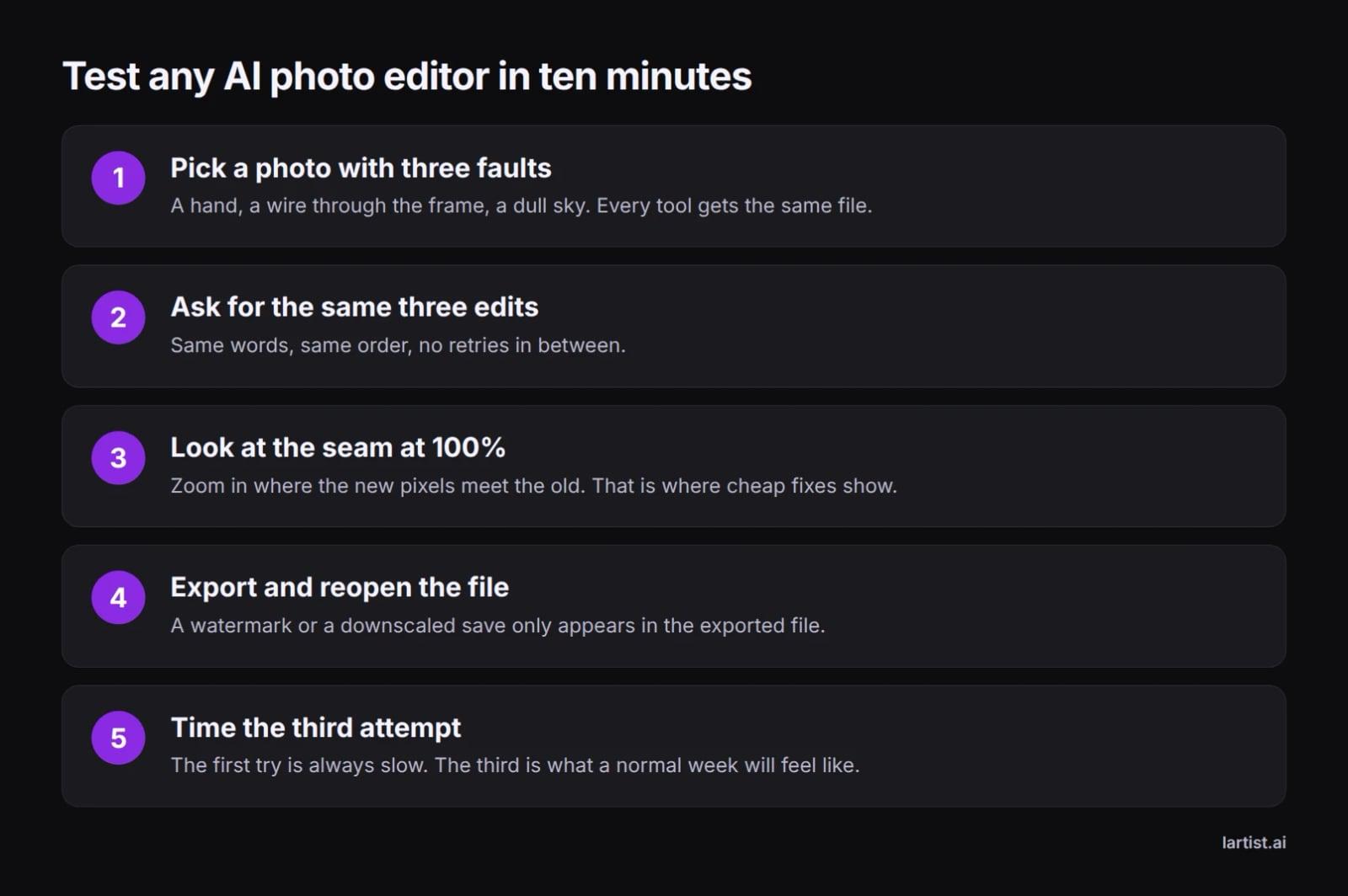
Time the third attempt, not the first. The first try is always slow, and the third is what a normal week of work will feel like.
What to take from Reddit threads
Reddit threads are worth reading for workflow, not for rankings: an answer is one person's camera, one app version and one deadline. Use them to find a tool to test, then run the ten minutes yourself.
Where Lartist Fits
Lartist is an AI art studio that runs in the browser: text to image, sketch to image, restyle, old photo restoration, background replacement, templates and object detection.
The studio editor is the repair bench. It takes the change you describe and repaints that part of the picture, whether that is a hand, a face, a stray object or one part of the frame. There is no separate erase tool, and none is needed for the jobs above.
It runs in English, French and German, and there is nothing to install. Every feature spends credits. Plans give credits each month or each year, and credit packs top them up. Open the Lartist studio to try it on your own photo, see the plans for how credits work, and read the thinking behind the studio.
For a full walk through one job, see swap or clean up a background, and for catalogue work for property listings.
FAQ
What is the best free AI photo editor?
There is no single answer, because free tiers differ in what they limit. zapier.com marks Canva as free for limited access, Pixlr as free for limited AI use and Lensa as free for limited features, and picsart.com keeps a separate free section. Check the watermark, the export size and the daily cap first. On Lartist, every feature spends credits, and the plans are on /pricing.
What is the best AI photo editor for iPhone?
picsart.com names Apple Photos Clean Up for iPhone and Google Photos Magic Editor for quick generative edits, and zapier.com picks Lensa for mobile portraits, which is free for limited features. If you would rather not install anything, the Lartist studio runs in the phone's browser in English, French and German.
Is there an AI photo editor with no restrictions?
The phrase usually means no watermark, no cap on edits, no device lock and no surprise block on your file. No guide on the first page ranks tools that way, so read the vendor's terms and open one exported file before you pay.
Can an AI photo editor fix a hand or a face in a photo I already have?
Yes, if the tool repaints just that area instead of regenerating the whole frame. Photoshop's Generative Fill works from a description, as zapier.com notes, and the Lartist studio editor handles the same jobs. Check the join between the patch and the original before you export.
Do AI photo editors work in a browser?
Several do. zapier.com names Pixlr and Canva as web tools, blog.evoto.ai picks Pixlr Express for web, and Lartist is a browser studio with nothing to install, in English, French and German. Open one tab, upload a photo, and you are editing without a download or a new device.
What is the difference between an AI photo editor and an AI image generator?
An editor changes the photo you have. A generator makes a new picture from a description. zapier.com puts it plainly: a generator recreates your image with changes rather than editing it, which is why it sets a lower bar for a photo editor.